IDPhoto4You: A Complete Guide to Free Online Passport Photo Creation
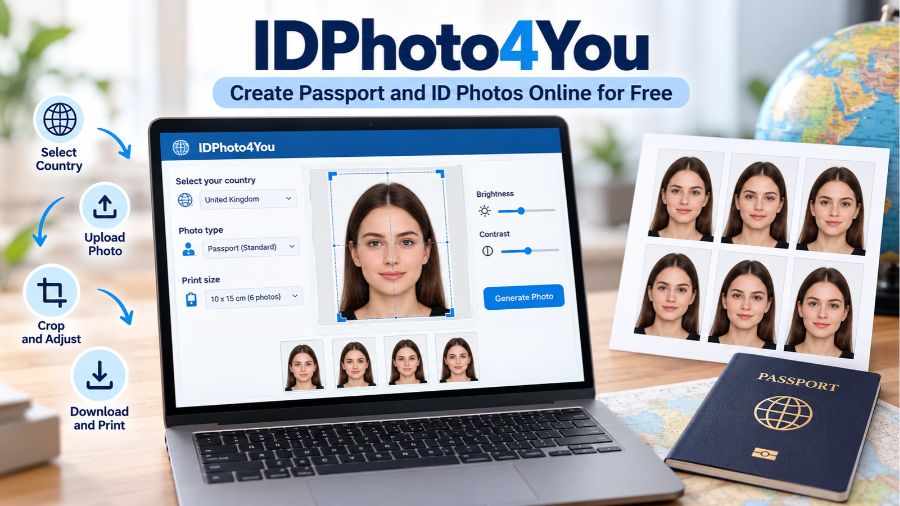
IDPhoto4You is a free online passport photo maker that helps people prepare photographs for passports, visas, and other identity documents without installing dedicated editing software. By allowing users to select photo specifications, upload an existing picture, adjust its framing, and generate a printable image, the service offers a convenient alternative to traditional photo-editing methods. Understanding how IDPhoto4You works, what features it provides, how it handles uploaded photographs, and where its limitations lie can help users decide whether it is suitable for their document photography needs.
What Is IDPhoto4You and How Does It Work?
IDPhoto4You is a browser-based photo preparation tool designed to simplify the process of creating passport-size and identity-document photographs. Rather than requiring users to learn professional image-editing software, it provides a guided workflow that begins with selecting a country, photo type, and print size. Users then upload a suitable photograph, adjust the cropping frame, make basic image corrections, and download the resulting image. The service supports standards for multiple countries and provides options for arranging photographs on printable sheets. Its central purpose is convenience: it helps users prepare an image to match selected technical dimensions, although users remain responsible for checking whether the finished photograph meets the relevant authority’s current requirements.
Key Features of IDPhoto4You
IDPhoto4You focuses on practical photo preparation rather than advanced portrait editing, making it particularly useful for people who need a straightforward document-photo workflow. Its main features include country-specific photo templates, adjustable cropping, brightness and contrast controls, different print layouts, and a downloadable JPEG output. The service also offers a simple picture mode for certain general applications, such as CV photographs, where a standard document-photo template may not be necessary. These capabilities make it possible to prepare a usable image without purchasing specialist software, although the quality of the result depends on the original photograph and the user’s adjustments.
Country-Specific Photo Standards
One of the most useful features of IDPhoto4You is its selection of country-specific photo standards. Users can choose the relevant country and photo type so that the cropping guide corresponds to the selected template. Different countries and document categories can require different dimensions, head proportions, backgrounds, and other photographic conditions. Selecting the correct template is therefore an important first step. However, a country template should not be treated as proof of official compliance: requirements may change, and individual authorities can impose additional conditions that a general-purpose photo maker cannot automatically verify.
Manual Cropping and Head Positioning
The cropping interface allows users to position and adjust a frame around the subject’s face. This is important because passport photographs generally require the head to appear at a specified scale and position within the image. IDPhoto4You’s current instructions explain that users must adjust the crop manually rather than relying on automatic face detection to select the appropriate frame. Users should align the top of the head and the bottom of the chin with the guide while keeping the face properly centered. Careful positioning helps prevent a technically incorrect crop, but it cannot compensate for a photograph taken from the wrong angle or with unsuitable facial positioning.
Brightness and Contrast Adjustments
The service includes brightness and contrast controls to help users improve the appearance of a photograph before generating the final image. These adjustments can be useful when an otherwise suitable picture appears slightly dark or has insufficient contrast. Nevertheless, editing should remain restrained. Excessive brightness can wash out facial details, while excessive contrast may create harsh shadows or obscure important features. The goal of a document photograph is accurate representation, not creative enhancement. Users should begin with a properly exposed original image and use the available controls only when necessary to correct minor technical problems.
Printable Photo Layouts
IDPhoto4You offers several print-layout options, including 9 × 13 cm, 10 × 15 cm, and 13 × 18 cm paper formats, as well as a single-photo option. When a printable sheet is selected, the service arranges multiple copies of the cropped photograph on one image. This can help users prepare several physical copies without manually duplicating and positioning each photograph in an editing application. The number of copies depends on the selected photo standard and paper size. For printing, users should ensure that their printer or photo laboratory preserves the intended dimensions instead of automatically resizing the image.
JPEG Output and Image Quality
IDPhoto4You accepts JPG and JPEG files within its published upload limits and produces a JPEG image for download. The official site specifies a maximum file size of 10 MB, minimum dimensions of 130 × 200 pixels, and maximum dimensions of 10,000 × 10,000 pixels. Meeting these technical limits does not guarantee a sharp final photograph. The original picture must contain sufficient detail, particularly around the face, for the cropped result to remain clear. A small, blurry, or heavily compressed source image may become noticeably worse when enlarged or printed, even if it passes the upload checks.
How to Use IDPhoto4You Step by Step
Using IDPhoto4You involves choosing the appropriate photo specification, uploading an image, adjusting the crop, and downloading the finished result. The process is relatively straightforward, but the initial photograph and the selected template deserve careful attention. A well-lit image with a plain background and a camera positioned at head height will generally provide a better starting point than a casual selfie with strong shadows or perspective distortion. Users should also check the official instructions for the intended document before beginning, particularly when applying for a passport, visa, or other identity credential with strict photographic requirements.
Step 1: Select the Country and Photo Type
Begin by choosing the country and document-photo type that correspond to your application. Select a suitable print size if you intend to produce physical copies. This choice matters because the template determines the dimensions and cropping guide used during processing. Avoid selecting a standard simply because its measurements look familiar; two countries may have similar photo dimensions but different requirements for head size, background, expression, or other details. If the intended document is not clearly covered by the available options, consult the relevant issuing authority rather than assuming that another country’s template will be accepted.
Step 2: Prepare and Upload a Suitable Photograph
Choose a clear photograph in which the subject faces the camera and the face is unobstructed. A plain, evenly lit background helps make the face easy to distinguish, while sufficient space around the head allows for accurate cropping. The website accepts JPG and JPEG files, with a maximum size of 10 MB and specified minimum and maximum image dimensions. Its instructions advise against uploading scanned photographs and pictures taken with a webcam. A recent photograph captured with a suitable camera or smartphone is generally a better starting point, provided it meets the destination authority’s rules.
Step 3: Adjust the Crop Frame
After uploading the image, use the crop frame to position the face according to the selected standard. Follow the displayed head-contour guide, paying attention to the top of the head, chin, and overall facial placement. Adjust the frame carefully instead of assuming that the initial position is correct. If the photograph was taken too close to the face, from an elevated angle, or with the head tilted, cropping may not resolve the underlying problem. When the result looks misaligned or cuts off important parts of the head, choosing a better original photograph is usually preferable to forcing an unsuitable image into the template.
Step 4: Adjust Image Appearance and Generate the Photo
Review the preview and make modest brightness or contrast adjustments if needed. Avoid using these controls to disguise poor lighting, remove important facial details, or make extensive changes to the subject’s appearance. Once the crop and basic image settings look appropriate, select the option to generate the photo. Check the resulting image before proceeding. A preview is useful for identifying obvious framing or exposure problems, but it is not an official compliance assessment. A photograph can look correct on screen and still fail because of dimensions, background conditions, facial positioning, or other application-specific rules.
Step 5: Download and Print the Finished Image
Download the generated JPEG from the results page and save it in a location where you can find it easily. If you require printed copies, use suitable photo paper and printer settings that preserve the intended size. The service recommends using printer software that allows accurate sizing or asking a digital photo laboratory to print the image at the correct dimensions. Avoid automatic fit-to-page settings that may alter the size of the photographs. If you are submitting a digital application, check the required pixel dimensions, file format, file-size limit, and upload instructions before using the downloaded image.
Is IDPhoto4You Free to Use?
IDPhoto4You describes its online photo-making service as free to use, making it an accessible option for people who want to prepare their own document photographs. Its basic workflow does not require users to install a dedicated desktop program or provide personal details to create an image. This can be particularly helpful for students, job applicants, travelers, and households that occasionally need passport-size photographs. However, free processing does not necessarily mean that the entire process costs nothing: users may still need to pay for photo paper, printer ink, or printing services. The main benefit is avoiding a separate charge for basic photo-formatting software or a simple editing service.
Is IDPhoto4You Safe for Personal Photographs?
IDPhoto4You publishes a privacy policy explaining how it handles uploaded images during photo processing. According to that policy, the service temporarily stores uploaded photographs on its server and automatically deletes them within six hours if they have not already been deleted by the user. The website also states that it does not share uploaded photographs with third parties unless required by law. Its published security information says that HTTPS protects images during upload and download. These policies offer useful information about the service’s intended data-handling practices, but users should remember that an uploaded passport photograph is personal information and that temporary server storage is different from processing a file entirely on their own device.
Understanding the Six-Hour Deletion Policy
The published policy states that uploaded photographs and their processed versions are automatically deleted within six hours of uploading. Users can also delete the images manually while their session remains accessible. Because the website operates anonymously, closing the browser can end the session and prevent the user from controlling the uploaded file through the website. Consequently, users should not assume that they can return later and remove an earlier upload manually. Anyone handling sensitive identity photographs should read the current privacy notice before uploading, use a trusted device, and avoid leaving downloaded images in shared folders or on public computers.
Practical Privacy Precautions
Even when a service publishes a clear retention policy, it is sensible to minimize the personal information exposed during an online workflow. Use a private device and a secure connection, avoid public Wi-Fi when possible, and do not upload other people’s photographs without their permission. After downloading the finished image, remove unnecessary copies from shared or public devices, particularly if you are using a computer that belongs to someone else. Remember that deleting a file from a website does not automatically remove copies saved in a browser’s download folder, cloud-synchronized folder, or photo application. Users who require stricter control over sensitive images may prefer an offline editing tool.
Advantages of IDPhoto4You
The main advantage of IDPhoto4You is that it combines several basic photo-preparation tasks in one accessible online service. Users can select a country-specific template, crop a photograph manually, adjust brightness and contrast, and prepare a printable image without learning complex editing techniques. Its free access makes it attractive for occasional use, while its browser-based design reduces the need to install additional software. Printable layouts can also save time when multiple physical copies are required. For people who already have a suitable photograph, these features offer a practical way to handle routine document-photo preparation from a computer or compatible mobile browser.
Limitations of IDPhoto4You
Although IDPhoto4You is useful for basic formatting, it does not eliminate every challenge involved in preparing an acceptable identity photograph. The current workflow requires manual cropping, so users must understand how to position the face correctly within the selected template. The tool also cannot guarantee that a photograph will satisfy every current passport or visa requirement. Incorrect lighting, shadows, unsuitable backgrounds, poor image quality, and camera angles can remain problems after cropping. Additionally, uploading photographs requires an internet connection, and temporary server storage may not suit people who prefer entirely local processing. These limitations make careful preparation and final verification essential.
Official Acceptance Is Not Guaranteed
A correctly sized photograph is not necessarily an acceptable passport or visa photograph. Authorities may assess facial proportions, expression, head coverings, background uniformity, image recency, image manipulation, and other criteria beyond basic dimensions. Digital applications may also have separate requirements for file size, resolution, and permitted file formats. IDPhoto4You explicitly warns that photographs produced by its service may be rejected by authorities. Users should therefore check the current rules published by the organization handling their application. If the requirements are unclear or the application is particularly important, a professional photo service familiar with those rules may be a safer choice.
Limited Editing Compared With Professional Software
IDPhoto4You is designed for simple adjustments rather than advanced image correction. Its cropping and brightness controls are useful for preparing an appropriate source photograph, but they are not a substitute for professional editing tools when a picture has significant technical defects. More importantly, document photographs should not be treated like creative portraits: extensive retouching or background manipulation may conflict with the applicable rules. Users should prioritize taking a compliant photograph correctly rather than relying on software to repair unsuitable images. This distinction is important for anyone expecting the tool to transform an ordinary selfie into a fully compliant document photograph automatically.
IDPhoto4You Compared With Other Passport Photo Options
IDPhoto4You is one option among several ways to prepare identity photographs. The most appropriate choice depends on whether the user values convenience, privacy, professional assistance, or control over the final output. A browser-based tool can be suitable for someone with a good original photograph and straightforward requirements. A dedicated editing application may be more appropriate for users who want local processing or additional controls, while a professional photo studio can provide assistance with lighting, camera positioning, and document-specific requirements. No option should be judged solely by its price or editing features; the accuracy of the final image and the rules of the receiving authority matter most.
Online Passport Photo Makers
Online photo makers are convenient because they allow users to prepare images without installing software. IDPhoto4You’s strengths include its manual crop interface, country-specific templates, basic adjustments, and printable layouts. Other online services may offer different levels of automated background removal, face positioning, or application-specific guidance, but their features and pricing should be checked individually. Users should also review privacy policies before uploading personal photographs to unfamiliar websites. A tool that promises automatic compliance should not be assumed to guarantee acceptance unless its capabilities and the relevant official requirements have been independently verified.
Mobile Apps
Mobile passport photo applications can be useful for people who take photographs and complete everyday tasks on their smartphones. Depending on the application, they may support camera capture, touch-based positioning, multiple document templates, and direct printing or sharing. However, individual apps differ in pricing, advertising, data handling, and the accuracy of their templates. An app’s availability in an app store does not establish that its photo specifications are current. Users should check the developer information, current reviews, privacy disclosures, and supported document types before choosing an application, particularly when the photograph will be used for an important official application.
Professional Photo Studios
A professional photo studio can be a better option when the receiving authority has strict requirements or when the user is unsure how to position the camera and subject. A photographer can help with lighting, background selection, framing, and producing a suitable print or digital file. This assistance may reduce avoidable mistakes, although professional preparation still cannot guarantee acceptance by every authority. A studio is also likely to involve a service fee, unlike IDPhoto4You’s free basic processing. The decision ultimately depends on the user’s confidence, the complexity of the requirements, and the consequences of submitting an unsuitable photograph.
Who Should Use IDPhoto4You?
IDPhoto4You is particularly suitable for people who already have a clear, well-lit photograph and want to format it for a recognized document-photo template. Students preparing application materials, travelers organizing paperwork, job seekers preparing a CV photograph, and families making routine photo copies may find the service convenient. It can also help users who need a printable sheet rather than a single image. However, people applying for documents with strict or frequently updated specifications should not rely on the editor alone. Users who lack a suitable source photograph, require extensive assistance, or are uncomfortable uploading personal images may benefit more from a different approach.
Tips for Getting Better Results With IDPhoto4You
The quality of the final photograph depends heavily on the picture supplied at the beginning. Take the original image in even lighting, avoid distracting objects behind the subject, position the camera at approximately head height, and leave enough room around the head for cropping. Ensure that the subject faces the camera and follows the expression and eye-position requirements of the intended document. Use a recent photograph that accurately represents the applicant. After processing, inspect the final crop at full size and verify the relevant official specifications. For printing, confirm that the output is not automatically resized. These practical steps can improve the result without relying on unnecessary editing.
Conclusion
IDPhoto4You is a useful free online tool for preparing passport-size, visa, and identity-document photographs through manual cropping, basic image adjustments, and printable layouts. Its straightforward workflow makes it appealing to users who want to avoid complex editing software or the cost of a separate formatting service. However, its convenience comes with important limitations: users must position the crop carefully, begin with a suitable photograph, consider the privacy implications of uploading personal images, and independently verify the applicable document requirements. Used with these precautions, IDPhoto4You can simplify routine photo preparation, but the final image’s compliance with official rules remains the user’s responsibility.
FAQs
1. Is IDPhoto4You completely free?
Yes, IDPhoto4You offers free online photo preparation, including cropping, basic adjustments, and printable layouts, although printing supplies or laboratory services may cost extra.
2. Does IDPhoto4You work on mobile phones?
IDPhoto4You is browser-based, so it can be accessed on compatible smartphones and tablets, although the cropping interface may be easier to manage on a computer.
3. What image formats does IDPhoto4You accept?
The website accepts JPG and JPEG photographs up to 10 MB, with minimum dimensions of 130 × 200 pixels and maximum dimensions of 10,000 × 10,000 pixels.
4. How long does IDPhoto4You store uploaded photographs?
According to its published privacy policy, uploaded photographs are automatically deleted within six hours, although users can delete them manually while their session remains accessible.
5. Can IDPhoto4You guarantee passport photo acceptance?
No, IDPhoto4You cannot guarantee acceptance. Applicants must verify current official requirements for dimensions, facial positioning, background, image quality, and other applicable conditions.
6. Is IDPhoto4You better than visiting a photo studio?
IDPhoto4You suits users comfortable editing photographs themselves, while a professional studio may provide helpful guidance with lighting, framing, and document-specific requirements.
More read: IDPhoto4You